differt2d.logic module
A toolbox for logical operations.
When approximation is enabled, a value close to 1 maps to True,
while a value close to 0 maps False.
Otherwise, functions will call their JAX counterpart. E.g.,
logical_or calls jax.numpy.logical_or
when approx is set to False.
Note
Whenever a function takes an argument named approx, it can take
three different values:
None: defaults todiffert2d.logic.ENABLE_APPROX, seeenable_approxfor comments on that;True: forces to enable approximation;or
False: forces to disable approximation.
- Truthy
An array of truthy values, either booleans or floats between 0 and 1.
alias of
Array, '*batch']|Array, '*batch']
- activation(x, alpha=100.0, function=<PjitFunction of <function hard_sigmoid>>)[source]
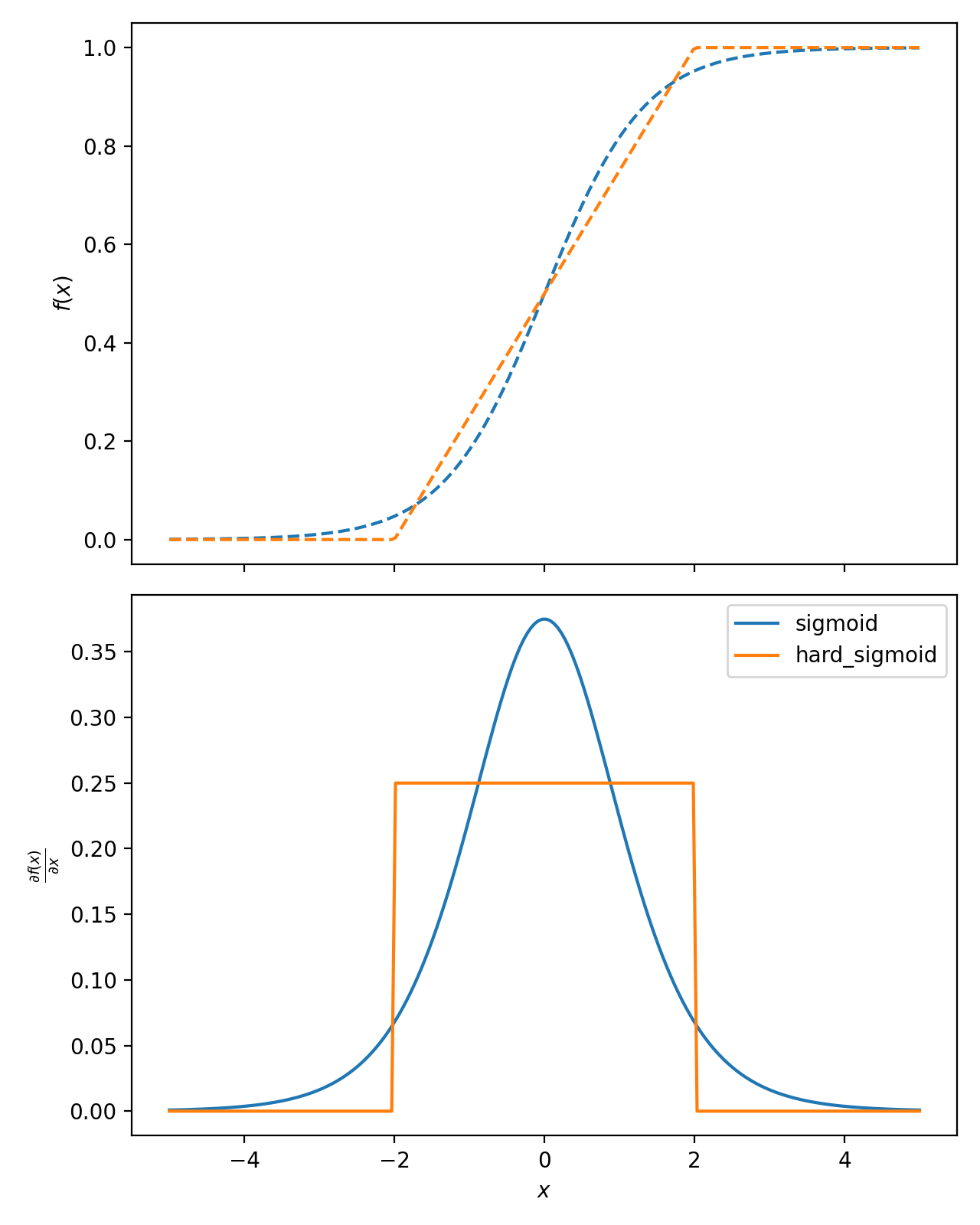
Element-wise function for approximating a discrete transition between 0 and 1, with a smoothed transition centered at
x = 0.0.Depending on the
functionargument, the activation function has the different definition.Two basic activation functions are provided:
sigmoidandhard_sigmoid. If needed, you can implement your own activation function and pass it as an argument, granted that it satisfies the properties defined in the related paper.- Parameters:
- Return type:
Array, '*batch']- Returns:
The corresponding values.
- EXAMPLES:
import matplotlib.pyplot as plt
import numpy as np
from differt2d.logic import activation, hard_sigmoid, sigmoid
from jax import grad, vmap

x = np.linspace(-5, +5, 200)

_, (ax1, ax2) = plt.subplots(2, 1, sharex=True, figsize=[6.4, 8])

for name, function in [("sigmoid", sigmoid), ("hard_sigmoid", hard_sigmoid)]:
    def f(x):
        return activation(x, alpha=1.5, function=function)

    y = f(x)
    dydx = vmap(grad(f))(x)
    _ = ax1.plot(x, y, "--", label=f"{name}")
    _ = ax2.plot(x, dydx, "-", label=f"{name}")

ax2.set_xlabel("$x$")
ax1.set_ylabel("$f(x)$")
ax2.set_ylabel(r"$\frac{\partial f(x)}{\partial x}$")
plt.legend()
plt.tight_layout()
plt.show()  # doctest: +SKIP
(
Source code,png,hires.png,pdf)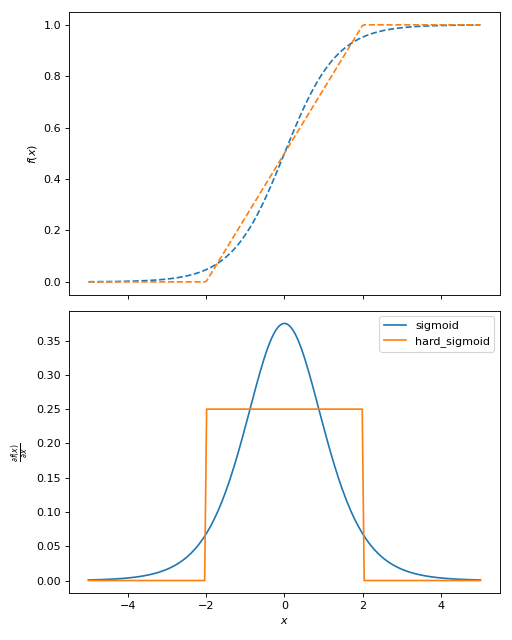
- disable_approx(disable=True)[source]
Context manager for disable or enabling approximation of true/false values with continuous numbers from 0 (false) to 1 (true).
This function is an alias to
enable_approx(not disable). For more details, refer toenable_approx.- Parameters:
disable (
bool, default:True) – Whether to disable or not approximation.
Note
Contrary to
enable_approx, there is noDISABLE_APPROXenviron variable, nordiffert2d.logic.DISABLE_APPROXconfig variable.
- enable_approx(enable=True)[source]
Context manager for enabling or disabling approximation of true/false values with continuous numbers from 0 (false) to 1 (true).
By default, approximation is enabled.
To disable approximation, you have multiple options:
use this context manager to disable it (see example below);
set the environ variable
DISABLE_APPROX(any value);update the config with
set_approx(False);or set, for specific logic functions only, the keyword argument
approxtoFalse.
- Parameters:
enable (
bool, default:True) – Whether to enable or not approximation.- Examples:
>>> from differt2d.logic import enable_approx, greater
>>>
>>> with enable_approx(False):
...     print(greater(20.0, 5.0))
True
You can also enable approximation with this:
>>> with enable_approx(True):
...     print(greater(20.0, 5.0))
1.0
Calling without args defaults to True:
>>> with enable_approx():
...     print(greater(20.0, 5.0))
1.0
Warning
Calling already-jitted functions after mutating
ENABLE_APPROXwill not produce any visible change. This is becauseENABLE_APPROXis evaluated once, at compilation.For example:
>>> import jax
>>> import differt2d.logic
>>> from differt2d.logic import enable_approx
>>>
>>> @jax.jit
... def f():
...     if differt2d.logic.ENABLE_APPROX:
...         return 1.0
...     else:
...         return 0.0
>>>
>>> with enable_approx(True):
...     print(f())
1.0
>>>
>>> with enable_approx(False):
...     print(f())
1.0
To avoid this issue, you can either disable jit with
jax.disable_jitor use theapproxparameter when available.>>> from jax import disable_jit >>> >>> @jax.jit ... def f(): ... if differt2d.logic.ENABLE_APPROX: ... return 1.0 ... else: ... return 0.0 >>> >>> with enable_approx(True), disable_jit(): ... print(f()) 1.0 >>> >>> with enable_approx(False), disable_jit(): ... print(f()) 0.0
- greater(x, y, approx=None, **kwargs)[source]
Element-wise logical
x > y.Calls
jax.numpy.subtractthenactivationif approximation is enabled,jax.numpy.greaterotherwise.- Parameters:
- Return type:
Union[Array, '*batch'],Array, '*batch']]- Returns:
Output array, with element-wise comparison.
- greater_equal(x, y, approx=None, **kwargs)[source]
Element-wise logical
x >= y.Calls
jax.numpy.subtractthenactivationif approximation is enabled,jax.numpy.greater_equalotherwise.- Parameters:
- Return type:
Union[Array, '*batch'],Array, '*batch']]- Returns:
Output array, with element-wise comparison.
- hard_sigmoid(x, alpha)[source]
Element-wise sigmoid, parametrized with
alpha.\[\text{hard_sigmoid}(x;\alpha) = \frac{\text{relu6}(\alpha x + 3)}{6},\]where \(\alpha\) (
alpha) is a slope parameter.See
jax.nn.hard_sigmoidandjax.nn.relu6for more details.
- is_false(x, tol=0.5, approx=None)[source]
Element-wise check if a given truth value can be considered to be false.
When using approximation, this function checks whether the value is close to 0.
- Parameters:
- Return type:
Array, '*batch']- Returns:
True if the value is considered to be false.
- is_true(x, tol=0.5, approx=None)[source]
Element-wise check if a given truth value can be considered to be true.
When using approximation, this function checks whether the value is close to 1.
- Parameters:
- Return type:
Array, '*batch']- Returns:
True array if the value is considered to be true.
- less(x, y, approx=None, **kwargs)[source]
Element-wise logical
x < y.Calls
jax.numpy.subtract(arguments swapped) thenactivationif approximation is enabled,jax.numpy.lessotherwise.- Parameters:
- Return type:
Union[Array, '*batch'],Array, '*batch']]- Returns:
Output array, with element-wise comparison.
- less_equal(x, y, approx=None, **kwargs)[source]
Element-wise logical
x <= y.Calls
jax.numpy.subtract(arguments swapped) thenactivationif approximation is enabled,jax.numpy.less_equalotherwise.- Parameters:
- Return type:
Union[Array, '*batch'],Array, '*batch']]- Returns:
Output array, with element-wise comparison.
- logical_all(*x, axis=None, approx=None)[source]
Returns whether all values in
xare true.Calls
jax.numpy.minif approximation is enabled,jax.numpy.allotherwise.- Parameters:
x (
Union[Array, '*batch'],Array, '*batch'],float,bool]) – The input array, or array-like.axis (
Union[int,tuple[int,...],None], default:None) – Axis or axes along which to operate. By default, flattened input is used.approx (
Optional[bool], default:None) – Whether approximation is enabled or not.
- Return type:
Union[Array, '*batch'],Array, '*batch']]- Returns:
Output array.
- logical_and(x, y, approx=None)[source]
Element-wise logical
x and y.Calls
jax.numpy.minimumif approximation is enabled,jax.numpy.logical_orotherwise.- Parameters:
- Return type:
Union[Array, '*batch'],Array, '*batch']]- Returns:
Output array, with element-wise comparison.
- logical_any(*x, axis=None, approx=None)[source]
Returns whether any value in
xis true.Calls
jax.numpy.maxif approximation is enabled,jax.numpy.anyotherwise.- Parameters:
x (
Union[Array, '*batch'],Array, '*batch'],float,bool]) – The input array, or array-like.axis (
Union[int,tuple[int,...],None], default:None) – Axis or axes along which to operate. By default, flattened input is used.approx (
Optional[bool], default:None) – Whether approximation is enabled or not.
- Return type:
Union[Array, '*batch'],Array, '*batch']]- Returns:
Output array.
- logical_not(x, approx=None)[source]
Element-wise logical
not x.Calls
jax.numpy.subtract(1 - x) if approximation is enabled,jax.numpy.logical_orotherwise.
- logical_or(x, y, approx=None)[source]
Element-wise logical
x or y.Calls
jax.numpy.maximumif approximation is enabled,jax.numpy.logical_orotherwise.- Parameters:
- Return type:
Union[Array, '*batch'],Array, '*batch']]- Returns:
Output array, with element-wise comparison.
- set_approx(enable)[source]
Enable or disable the approximation in future function calls.
Note that JIT-compiled version will not be affected if they were compiled before this function was called.
>>> from differt2d.logic import greater, set_approx
>>>
>>> set_approx(False)
>>> print(greater(20.0, 5.0))
True
- sigmoid(x, alpha)[source]
Element-wise sigmoid, parametrized with
alpha.\[\text{sigmoid}(x;\alpha) = \frac{1}{1 + e^{-\alpha x}},\]where \(\alpha\) (
alpha) is a slope parameter.See
jax.nn.sigmoidfor more details.